

Having your CAC certificate is a major milestone, but a business without an active tax profile is like a car with no fuel — it simply won’t go far. In Nigeria, the tax system has moved toward Identity Integration (linking tax to NIN and RC numbers). The Federal Inland Revenue Service (FIRS) now operates a fully digital TaxPro Max ecosystem, and this is where your business becomes officially “alive” in the tax system.
If you are following our Ultimate Guide on How to Start a Business in Nigeria, you know that legal registration is just the first step. Activating your TIN on TaxPro Max is the technical move that makes your business functionally operational.
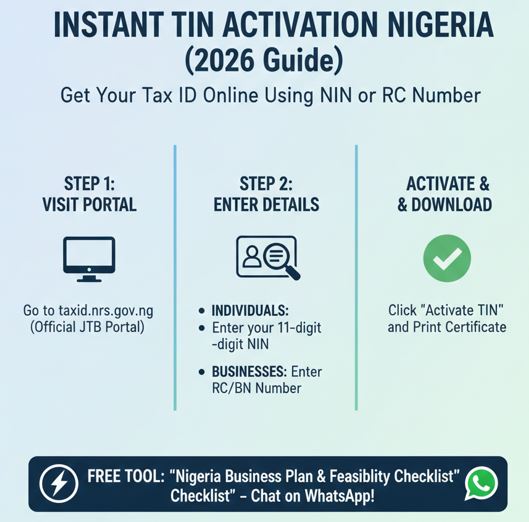
Modern registration (CAC) automatically triggers TIN generation. This is a permanent feature of the “Ease of Doing Business” initiative in Nigeria. While the CAC automatically generates a Tax Identification Number (TIN) once your registration is approved, it often sits in a dormant state until you claim it. The Nigerian government centralizes tax data through the JTB portal. While the interface may change, the process of using your NIN or RC number remains the standard
Why You Need a TIN
Without TIN and its activation, you cannot:
- Log in to the FIRS portal to file returns.
- Generate a Tax Clearance Certificate (TCC).
- Open a corporate bank account, as most banks now verify TIN activity in real-time via the FIRS API.
- Applying for Government Grants/Loans.
- Clearing Goods at the Port (Import/Export).
- Obtaining a Certificate of Occupancy (C of O).
This guide is a practical, no-fluff manual for activating your FIRS TIN online—step by step—so your business is fully compliant and ready to operate in Nigeria.
Step 1: The 48–72 Hour Wait & Initial Verification
Once your CAC registration is approved, a Tax Identification Number (TIN) is automatically generated as I said before for your business. However, this TIN is not immediately accessible because it must first synchronize with the FIRS database.
Why the delay?
In Nigeria, this 48–72 hour waiting period is normal. It is largely due to secondary verification of directors’ or proprietors’ NINs through the integrated NIMC–FIRS verification system. Until this process is completed, your TIN may not appear online.
What to do after 48 hours Period
After waiting at least 48 hours, your next step is to confirm whether the TIN has been successfully synced.
- Visit the official FIRS TIN Verification Portal
- Select your search option
- Choose “Registration Number (RC/BN)” from the Select Search Criteria dropdown.
- Enter your CAC number correctly
- Use RC for Limited Liability Companies or BN for Business Names
- Example: RC1234567 or BN1234567 (no spaces).
- Submit the search
Understanding the Result
If your business details appear (showing your name, registration number, and an Active status), your TIN has been successfully created and is ready for activation.
If “No Record Found” appears after 72 hours, don’t panic. This simply means the data sync failed.
In that case, visit the nearest FIRS office and request a Manual Data Push at the Taxpayer Service desk. Take along:
- Your original CAC certificate
- A valid means of identification
Claiming Your Digital Tax Profile
At this stage, your TIN exists—but you haven’t fully taken control of it yet. To file returns, manage taxes, or apply for a Tax Clearance Certificate (TCC), you must first claim and activate your digital tax account.
This brings us to the next phase of the process.
Step 2: Self-Registration on TaxPro Max (Activating Your TIN)
Once your TIN is visible on the FIRS verification portal, you can proceed to TaxPro Max, where you will set up your login credentials, secure your account, and officially activate your tax profile.
- Visit the Portal
- Go to firs.gov.ng and click on the “New Taxpayer? Register Here” button. In 2026, this module has been upgraded to a “Self-Service” flow that pulls your data directly from the CAC using your RC or BN number
- Input Your TIN
- Enter your verified TIN. The system will automatically pull your business name and registered address from the CAC database.
Check: Ensure the name that appears matches your certificate exactly. If there is a slight spelling error, you may need to resolve it via the “Data Validation” tab before proceeding.
The “Official Email” Rule
Provide a functional company email address. This is the most critical technical detail in this step.
This email becomes:
- Your permanent username for all future filings.
- The destination for all FIRS notices, tax assessments, and receipts.
- The only recovery path if you lose access to your account.
My candid Advice: Do not use a personal email (like daddylovespoundedyam@gmail.com) that you might abandon or lose access to. Create a professional company email (e.g., admin@yourbusinessname.ng or tax@brandname.com) before starting this step
Step 3: Document Upload & Profile Completion
To move from “Registered” to “Active,” FIRS requires you to upload digital copies of your core documents.
(PDF format, under 300kb each):
- CAC Status Report (showing directors/proprietors.
- Utility Bill (for the registered office address provided to CAC)
- Director’s ID (the same NIN-linked ID used for your CAC registration)
Once approved, your tax profile becomes fully operational.
Step 4: The Security Layer (2FA Activation)
Upon submission, you will receive an activation link via email.
- Create Password: Choose a strong password
- Enable 2FA: Under the 2026 Nigeria Tax Administration Act, all corporate accounts must enable
Two-Factor Authentication (2FA), usually via an SMS code sent to the director’s NIN-linked phone number.
This protects your tax account from fraud and unauthorized access.
- Transition: From Taxpayer to Business Operator. Your TIN is now active.
You are officially a recognized taxpayer in the Federal Republic of Nigeria.
This activation is the final legal “key” you need.
With an active TIN and your CAC certificate in hand, you are ready for the most satisfying step of the journey: Opening your corporate bank account.
This is where you finally separate your personal money from your business wealth and start building a financial history that banks will respect.
Frequently Asked Questions (FAQs)
Q1: How long does it take to get a TIN after CAC registration?
A: In 2026, the process is near instant. Once your CAC certificate is issued, the system automatically triggers a TIN generation. However, it may take 48 to 72 hours for the record to sync from the CAC portal to the Joint Tax Board (JTB) database.
Q2: Is my NIN the same as my TIN?
A: For individuals and sole traders, yes. The Nigerian government has unified identity management. Your 11-digit NIN is now your primary Tax Identification Number. For Limited Liability Companies (LTD), your RC number serves as your corporate Tax ID.
Q3: Why does the portal say “No Record Found” when I search for my TIN?
A: This usually happens for three reasons:
Your registration is very recent (wait 72 hours).
Your phone number or email on the CAC portal does not match your NIN records.
Your business was registered before the digital integration (pre-2020). If this is the case, you may need to visit the nearest FIRS office for “legacy data migration.”
Q4: How much does it cost to activate a TIN online?
A: Activating and retrieving your TIN is 100% Free. Do not pay any agent to “generate” a TIN for you on the official JTB or NRS portals.
Q5: Can I open a bank account without a TIN?
A: No. Under the current CBN and Finance Act mandates, no commercial bank in Nigeria can open a business or corporate account without a verified and active Tax Identification Number.
Registration is just Step 1. To manage your taxes and profits like a pro, download our Nigeria Business Plan Template and Feasibility Checklist. It includes aready Regulatory Roadmap to keep you compliant with the FIRS and State IRS

WORKS ON MOBILE AND WHATSAPP WEB